
logo
    • Buy Crypto
    • Markets
    • Futures
    • Spot
    • Earn
    • Affiliates & AI
    • More
    Popular topics
    Latest articles
    Featured articles
    Announcements
    Latest updates
    Futures events
    Spot events
    Rewards
    TradFi
    Listings/Delistings
    Spot listings
    Futures listings
    Spot delistings/maintenance
    Futures delistings/maintenance
    Earn delistings/maintenance
    About WEEX
    Community channels
    Account security
    About the platform
    Compliance
    Terms of Use and Policies
    Careers
    FAQ
    Deposit/Withdrawal
    Account access and verification
    Explore WEEX
    Common trading issues
    Futures essentials
    Compensation
    Copy trading
    How-to guides
    FAQ
    Elite traders
    Copiers
    WEEX app
    Downloading the app
    Quick Buy/OTC
    Quick Buy
    ChipPay
    OSL Pay
    P2P
    P2P announcements
    Getting started
    Merchant guide
    P2P appeals
    P2P Trading Tips and rules
    WEEX API
    API announcements
    API trading pairs
    Tutorials
    Futures trading
    Futures guide
    Auto Earn
    Spot trading
    Glossary
    Affiliate program
    Earn
    Staking
    Hackathon
    Hackathon updates
    1. Help Center
    2. P2P
    3. Merchant guide
    4. How to post P2P ads on WEEX
    Popular topics
    Latest articles
    Featured articles
    Announcements
    Latest updatesFutures eventsSpot eventsRewardsTradFi
    Listings/Delistings
    Spot listingsFutures listingsSpot delistings/maintenanceFutures delistings/maintenanceEarn delistings/maintenance
    About WEEX
    Community channelsAccount securityAbout the platformComplianceTerms of Use and PoliciesCareers
    FAQ
    Deposit/WithdrawalAccount access and verificationExplore WEEXCommon trading issuesFutures essentialsCompensation
    Copy trading
    How-to guidesFAQElite tradersCopiers
    WEEX app
    Downloading the app
    Quick Buy/OTC
    Quick BuyChipPayOSL Pay
    P2P
    P2P announcementsGetting startedMerchant guideP2P appealsP2P Trading Tips and rules
    WEEX API
    API announcementsAPI trading pairs
    Tutorials
    Futures tradingFutures guideAuto EarnSpot tradingGlossaryAffiliate program
    Earn
    Staking
    Hackathon
    Hackathon updates

    How to post P2P ads on WEEX

    By: WEEX
    |
    0

    How to post P2P ads on the WEEX website

    Step 1: Access the ad posting page
    1. Log in to the WEEX website → Navigation bar → Buy Crypto → P2P Trading
    2. Use the "Post New Ad" button in the top-right corner of the screen to enter the ad creation page.
    Step 2: Ad details
    1. Choose ad type: Use "I Want to Buy" to post a buy ad, or "I Want to Sell" to post a sell ad.
    2. Choose crypto and fiat: Select the crypto (such as USDT, BTC) and fiat currency you want to trade.
    3. Set price type: Set the ad price, quantity, and limit.
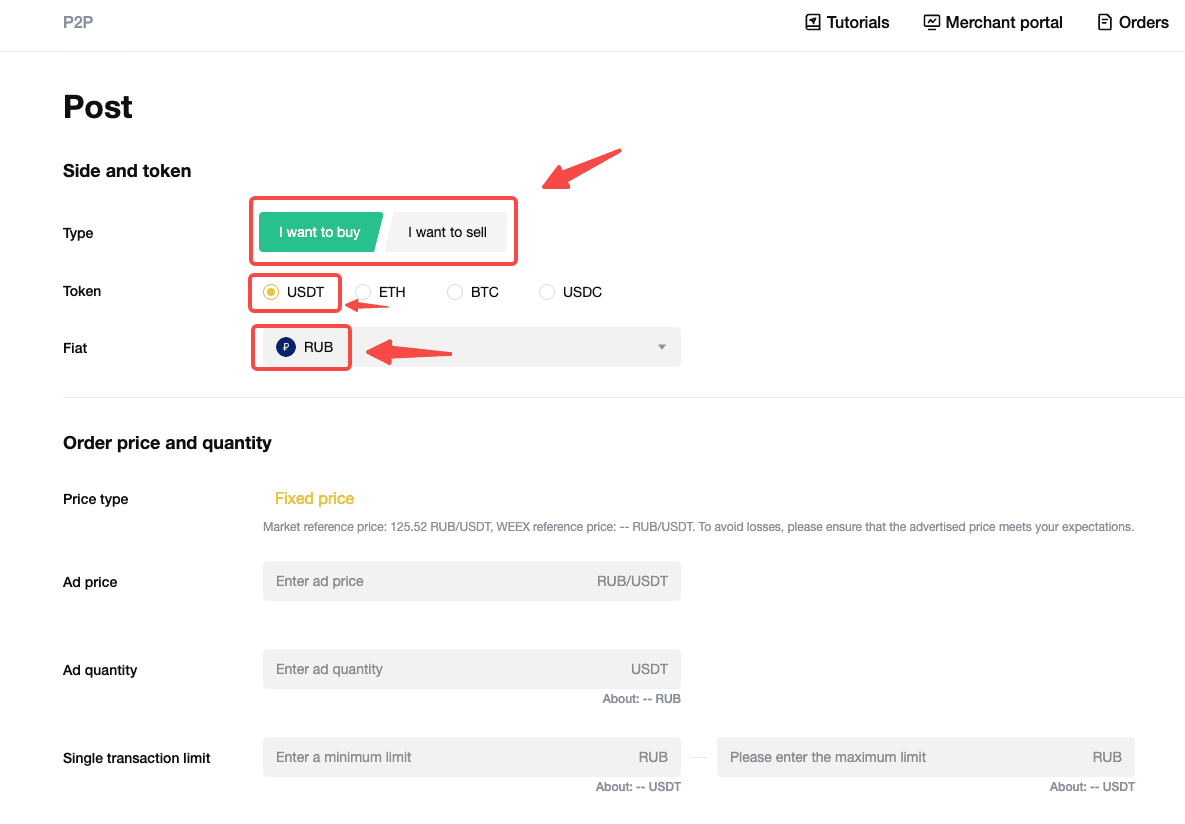
    Step 3: Ad settings
    1. Set trade details: Set the ad price, quantity amount, limits, and payment methods.
    2. Set payment window:
    • Specify the payment window for the buyer to complete the transfer (for example: 15, 20, or 30 minutes).
    • The order will be automatically canceled if payment is not completed within the set time period.
    Step 4: Additional ad details (optional)
    1. Automated reply: Set up a message that will be automatically sent via the online chat window when an order is placed.
    2. Advertiser terms: State the requirements or guidelines related to the trade. These terms will be displayed on the order page but will not be automatically sent to the chat.
    3. Trading requirements: Enable counterparty conditions to allow only users who meet specific requirements to place orders (for example, users who have completed phone verification). Users who do not meet the criteria will be unable to place orders.
    Step 5: Review and publish your ad
    1. Confirm agreements: Check the box to confirm that you have read and agree to the agreements.
    2. Publish: Use the "Submit" button to publish your ad.
    Step 6: Manage your ads
    1. View the status of your ads under the "My Ads" tab in the "More" section. You can edit, delist, or share your ads at any time.


    How to post P2P ads on the WEEX app

    Step 1: Visit the P2P ad posting page
    1. Log in to the app and find the "P2P" icon on the homepage.
    2. On the P2P page, tap the menu button (three dots) in the top-right corner, then select "Post New Ad".
     
    Step 2: Ad details
    1. Use "I Want to Buy" to post a buy ad, or "I Want to Sell" to post a sell ad.
    2. Configure the following details in the ad creation page:
    • Crypto and fiat: Select the crypto and fiat you want to use for trading.
    • Price type: Set the ad price and quantity.
    • Single transaction limit: Set the minimum and maximum transaction amounts allowed per order.
     
    Step 3: Ad settings
    1. Select payment method: Select one or more payment methods (such as bank transfer, PayPal).
    2. Set payment window: Specify the payment window for the buyer to complete the transfer (for example: 15, 20, or 30 minutes). The order will be automatically canceled if payment is not completed within the set time period.
    3. Automated reply (optional): Set up a message that will be automatically sent via the online chat window when an order is placed.
    4. Advertiser terms (optional): State the requirements or guidelines related to the trade. These terms will be displayed on the order page but will not be automatically sent to the chat.
    5. Trading requirements (optional): Set conditions to filter counterparties, such as limiting the order to those who have completed phone verification.
    Step 4: Publish your ad
    1. Confirm agreements: Check the box to confirm that you have read and agree to the agreements.
    2. Publish: Use the "Submit" button to publish your ad.
    Step 5: Manage your ads
    On the P2P page, tap the menu button (three dots) in the top-right corner and select "My Ads." You can view the status of your ads and edit, delist, or share them at any time.
     

    FAQ

    Which users can post ads on WEEX P2P?
    Currently, only verified P2P merchants can post ads. Apply to become a WEEX P2P merchant.
     
    What types of ads can I post?
    Select "I Want to Buy" to post a buy ad, or "I Want to Sell" to post a sell ad.
     
    Can I limit who engages with my ad?
    Yes, you can limit the ad to specific users by enabling trading requirements (for example: limit to users who have completed phone verification).
     
    What should be included in the "Automated Reply" and "Advertiser Terms"?
    • Automated reply: A brief introduction or instructions for buyers/sellers, such as payment confirmation steps.
    • Advertiser terms: Additional requirements or conditions, such as accepted payment methods or specific order rules.
     
    Are there fees for posting P2P ads?
    Posting a P2P ad on WEEX is free. But transaction fees may apply depending on the payment method or bank you choose.
    Related articles
    How to Export P2P Order HistoryWEEX P2P Merchant Violations and Enforcement PolicyVerified NGN Merchant Growth Challenge | Get up to 67 USDT!WEEX P2P Merchant GuidelinesHow can I cancel my WEEX P2P merchant status?
    Share
    copy

    Gainers

    logoCommunity
    iconiconiconiconiconiconicon
    Customer Support:@weikecs
    Business Cooperation:@weikecs
    Quant Trading & MM:bd@weex.com
    VIP Program:support@weex.com
    • About Us
    • Announcement Center
    • Media Kit
    • WEEX Community
    • WXT Zone
    • Announcement
    • Legal Statement
    • Risk Disclosure
    • Terms and Policies
    • Privacy Policy
    • Whistleblower Notice
    • AML/CTF Policy
    • Law Enforcement
    • User Guide
    • Product Launches
    • Crypto News
    • Product Launches
    • Crypto Wiki
    • Learn
    • Q&A
    • Spot
    • Futures
    • Glossary
    • VIP Program
    • Download
    • Affiliate
    • Protection Fund
    • Proof of Reserves
    • Sitemap
    • ETFs
    • Crypto Prices
    • Price Predictions
    • WXT Price
    • BTC Price
    • ETH Price
    • DOGE Price
    • How to Buy Crypto
    • How to Buy WXT
    • How to Buy BTC
    • How to Buy ETH
    • How to Buy DOGE
    • Help Center
    • Fee Schedule
    • Trading Rules
    • WEEX Academy
    • Contact Verifier
    • Submit Feedback
    • About Us
    • Announcement Center
    • Media Kit
    • WEEX Community
    • WXT Zone
    • Announcement
    • Help Center
    • Fee Schedule
    • Trading Rules
    • WEEX Academy
    • Contact Verifier
    • Submit Feedback
    • Customer Support Bot
    • VIP Services
    • Legal Statement
    • Risk Disclosure
    • Terms and Policies
    • Privacy Policy
    • Whistleblower Notice
    • AML/CTF Policy
    • Law Enforcement
    • Proof of Reserves
    • Invite Friends
    • OTC
    • Download
    • Affiliate
    • VIP Program
    • API
    • Broker
    • Listing Application
    • Affiliate T&C
    • Sitemap
    • Futures
    • Spot
    • Copy Trade
    • Markets
    • WEEX Store
    • User Guide
    • Product Launches
    • Crypto News
    • Product Launches
    • Crypto Wiki
    • Learn
    • Q&A
    • Spot
    • Futures
    • Glossary
    • VIP Program
    • Download
    • Affiliate
    • Protection Fund
    • Proof of Reserves
    • Sitemap
    • ETFs
    • Crypto Prices
    • Price Predictions
    • WXT Price
    • BTC Price
    • ETH Price
    • DOGE Price
    • How to Buy Crypto
    • How to Buy WXT
    • How to Buy BTC
    • How to Buy ETH
    • How to Buy DOGE
    • About Us
    • Announcement Center
    • Media Kit
    • WEEX Community
    • WXT Zone
    • Announcement
    • Help Center
    • Fee Schedule
    • Trading Rules
    • WEEX Academy
    • Contact Verifier
    • Submit Feedback
    • Legal Statement
    • Risk Disclosure
    • Terms and Policies
    • Privacy Policy
    • Whistleblower Notice
    • AML/CTF Policy
    • Law Enforcement
    • Customer Support Bot
    • VIP Services
    • Futures
    • Spot
    • Copy Trade
    • Markets
    • WEEX Store
    • Proof of Reserves
    • Invite Friends
    • OTC
    • Download
    • Affiliate
    • VIP Program
    • API
    • Broker
    • Listing Application
    • Affiliate T&C
    • Sitemap
    • User Guide
    • Product Launches
    • Crypto News
    • Product Launches
    • Crypto Wiki
    • Learn
    • Q&A
    • Spot
    • Futures
    • Glossary
    • VIP Program
    • Download
    • Affiliate
    • Protection Fund
    • Proof of Reserves
    • Sitemap
    • ETFs
    • Crypto Prices
    • Price Predictions
    • WXT Price
    • BTC Price
    • ETH Price
    • DOGE Price
    • How to Buy Crypto
    • How to Buy WXT
    • How to Buy BTC
    • How to Buy ETH
    • How to Buy DOGE

    Where new wealth is made

    Download app

    Sign Up
    h5 logo
    Download